Tips & setup
Hearing your voice twice? Check the two monitoring paths
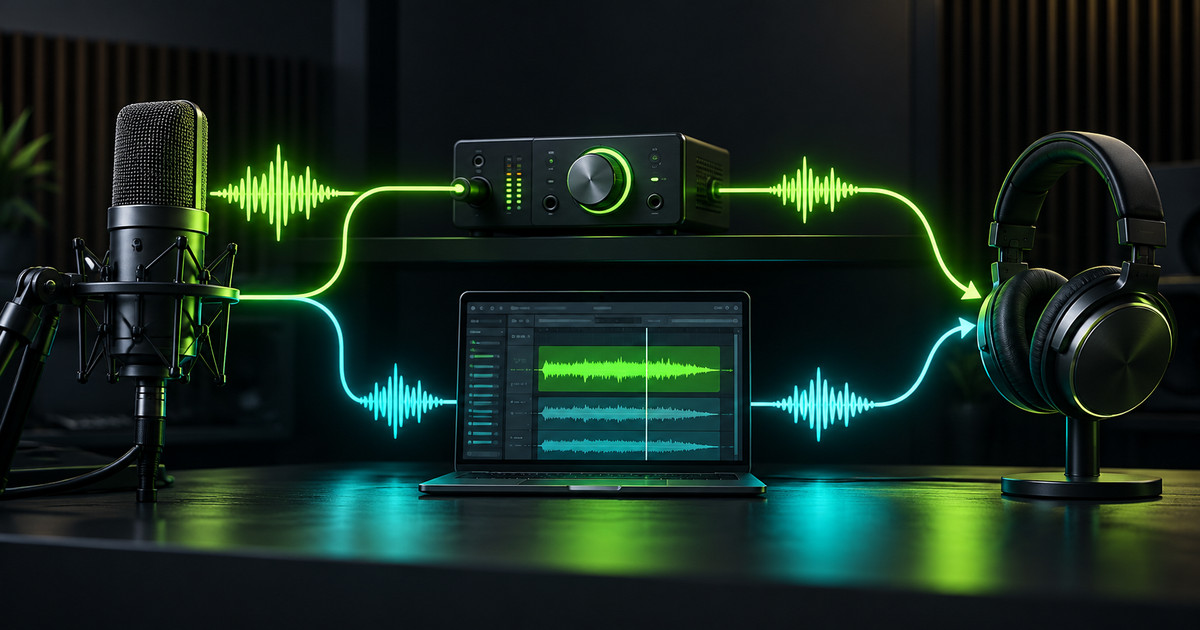
Your headphones may receive both direct monitoring and the signal returning from your music app. Choose a path for the task, then make a short recording to compare.
Based on manufacturer documentation. Steps may vary by version.
One microphone can reach your headphones twice
If you hear a second voice or your voice sounds thin and unusual, two listening paths may be active. One comes directly from the interface; the other returns from your music app slightly later. Focusrite explains that combining them can produce an echo or alter the tone of your voice.
Monitoring means listening while you record. Doubled audio has other possible causes, so first check whether these two paths are active together.
To listen directly through the interface
If your interface supports direct monitoring, it can send the input to your headphones and to the app for recording at the same time. This listening path does not pass through plug-ins running in your music app.
Enable direct monitoring using your model’s instructions, then disable input monitoring on the recording track. In Ableton Live 12, set Monitor to Off, keep the track armed and record normally. Off disables that track’s live listening path; it does not cancel recording.
To hear plug-ins while singing
To hear the app’s effects while singing, turn off direct monitoring for that microphone and listen through the app. In Ableton Live 12, set Monitor to Auto and arm the recording track.
With Auto, input monitoring is active when the track is armed, but clip playback also affects what you hear. Try an empty track first. Hearing effects while singing does not by itself establish that they are printed into the recorded audio file.
Compare one change at a time
Use these steps to check whether doubling occurs during live monitoring or when you play back the recording.
- Note or photograph the current settings, and use headphones at a comfortable level.
- Choose one listening path for the task. Repeat the same sentence and check that the other path is off.
- Record briefly, stop and listen back. Note whether doubling occurs during live monitoring, playback or both.
Controls depend on the model and version
The examples above use Ableton Live 12. Other apps and versions may call the control Input Monitoring or use a different button. Direct monitoring may be controlled on the interface or in its manufacturer’s software. Follow the guide for your exact model and generation.
Need help checking the listening paths?
Send ToneLumo the app name and version, interface model and a settings screenshot with private information hidden. Tell us when the doubling occurs. We assess the work and agree on the scope and price before a remote appointment.
Sources and check dates
- Focusrite — I'm hearing an echo when using Direct Monitoring · Checked 2026-10-20
- Focusrite — What is direct monitoring? · Checked 2026-10-20
- Ableton — Recording Audio · Checked 2026-10-20
- Ableton Live 12 — Routing and I/O: Monitoring · Checked 2026-10-20
- Focusrite — Scarlett 2i2 4th Gen hardware features: Direct Monitor · Checked 2026-10-20